Start here
OKR basics, then your first OKRs
Learn the four terms, then set up your first OKRs in four steps.
OKR basics
The meaningful change you want to make over a longer horizon, usually 6–12 months. Concrete, and ambitious enough to feel a little uncomfortable.
O1 Scale AI meaningfully and safely across GovTech and Whole-of-Government
A measurable result that shows whether you're making progress toward the objective. Usually set or refreshed each quarter. An outcome, not an activity.
Read them together: 3 to 5 key results should add up to the objective's definition of done for the quarter. If they're all met, the objective is achieved.
1.2 Achieve ≥70% weekly active usage in September 2026, among GovTech AI users
A dated progress post on a key result: progress %, a status (On track, At risk, Off track) and the detail behind it. Objectives can also receive status updates, but their progress is calculated automatically from their key results.
Optional work items under an objective or key result, with a deadline, people and a status. Use them when the work itself needs tracking.
Objective and key result definitions adapted from What Matters (John Doerr) and Google re:Work.
Objectives run longer. Key results are shorter.
Set objectives for 6–12 months, and key results each quarter. If a longer-term target spans several quarters, break it into quarterly steps: for example, 30% → 45% → 60% → 70% instead of one 70% target at year end.
Why: a quarterly target can be checked within the review cycle, so slippage shows up in weeks, not at year end. It also gives teams a chance to change course each quarter without moving the long-term goal.
Set up your first OKRs in 4 steps
- 1
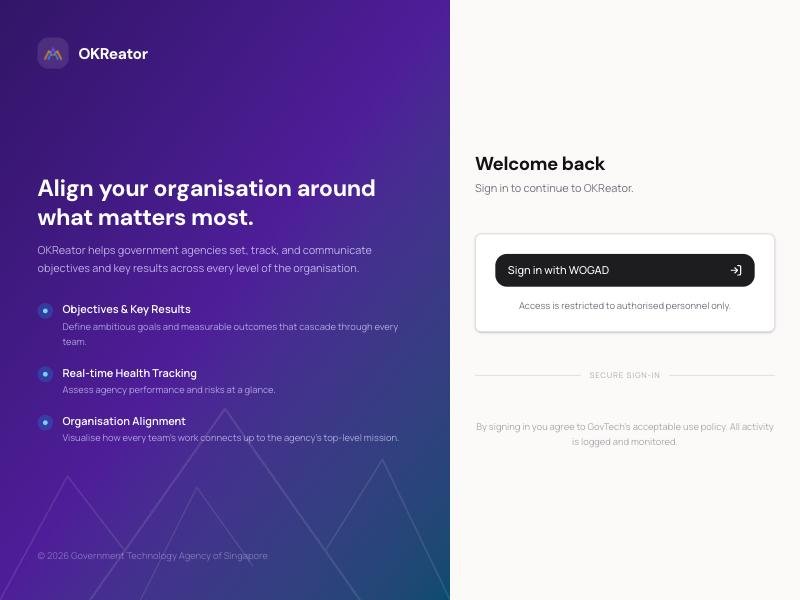
Sign in with WOGAD
Go to okr.tech.gov.sg and click Sign in with WOGAD. Use your usual government account; there is no separate password.
- 2
Choose where your OKR lives
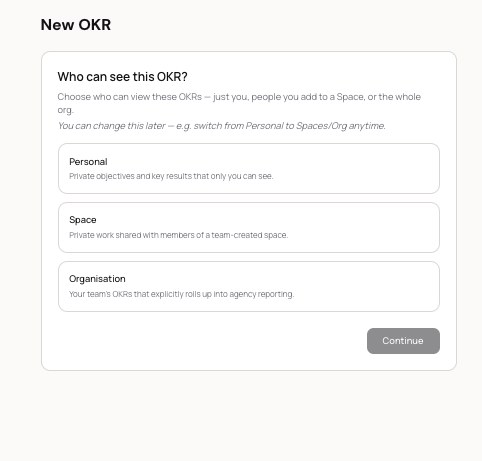
Click + New OKR. OKReator first asks Who can see this OKR? Pick the option that matches how the work is organised. You can switch later. What each option means.
- 3
Set up the objective and its key results
Take the most care over this step. Getting people, cycles and measurement right now saves guesswork every time you report.
On the create screen, check Creating OKR for shows the right organisation, then fill in the objective. You can draft several objectives, each with its key results, in one go.
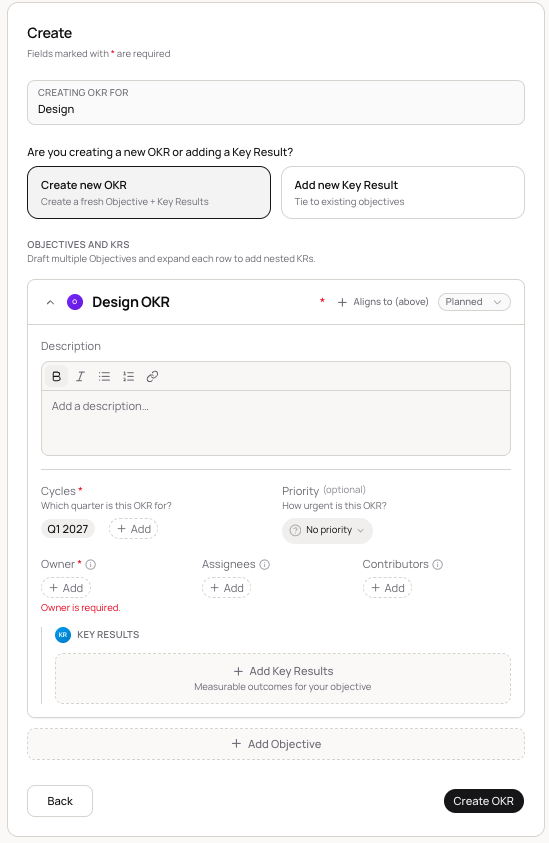 Cycles — Tag every quarter the objective runs for, using + Add. An objective can span several quarters; set its key results one quarter at a time. Why.Aligns to (above) — Link the objective to the higher-level objective or key result it contributes to. How.People
- Owner — The person accountable. Required. You can add more than one, but keep it tight so accountability stays clear.
- Assignees — Directly accountable to the owner for the key result, and doing the work.
- Contributors — People who help, such as colleagues from other divisions or someone who manages reporting of updates.
Key results — Click + Add Key Results and add 3 to 5. For each, write down how it will be measured.Define how each key result is measuredAgree this before the quarter starts and put it in the key result's description. At reporting time, anyone can compute progress the same way.KR 3.1 Reduce time to fill from 60 days to 45 days by 31 DecMetric
Median calendar days to fill a role
How it's computed
From job requisition approval to offer acceptance, for roles filled in the quarter
Data source
HR recruitment system, monthly export
Baseline
60 days (Q3 median, recorded 1 Oct)
Target
45 days
Update cadence
Monthly, after the export
Illustrative example.
Or ask Claude
Draft one objective with 3 to 5 measurable key results for Q4 2026 from these priorities. For each KR, suggest a metric, how it's computed, a data source and a baseline. Show me before creating anything: …
- 4
Record baselines, then post updates
Record each key result's starting value at the start of the quarter. Then post updates with the progress %, a status and the detail behind it. How to compute progress.
What's in the sidebar
Three homes for an OKR
Organisation OKR
Owned by an agency, cluster, division or team, and part of agency reporting. Use it when the work sits within the org hierarchy.
OKR Space
A home for programme or cross-division OKRs that don't sit under one cluster, division or team. The space owner decides who's in it and whether it's visible to the wider agency.
Personal
Your own OKRs, such as individual OKRs agreed with your manager each quarter, or drafts before you share.
Reading the My Agency's OKRs page
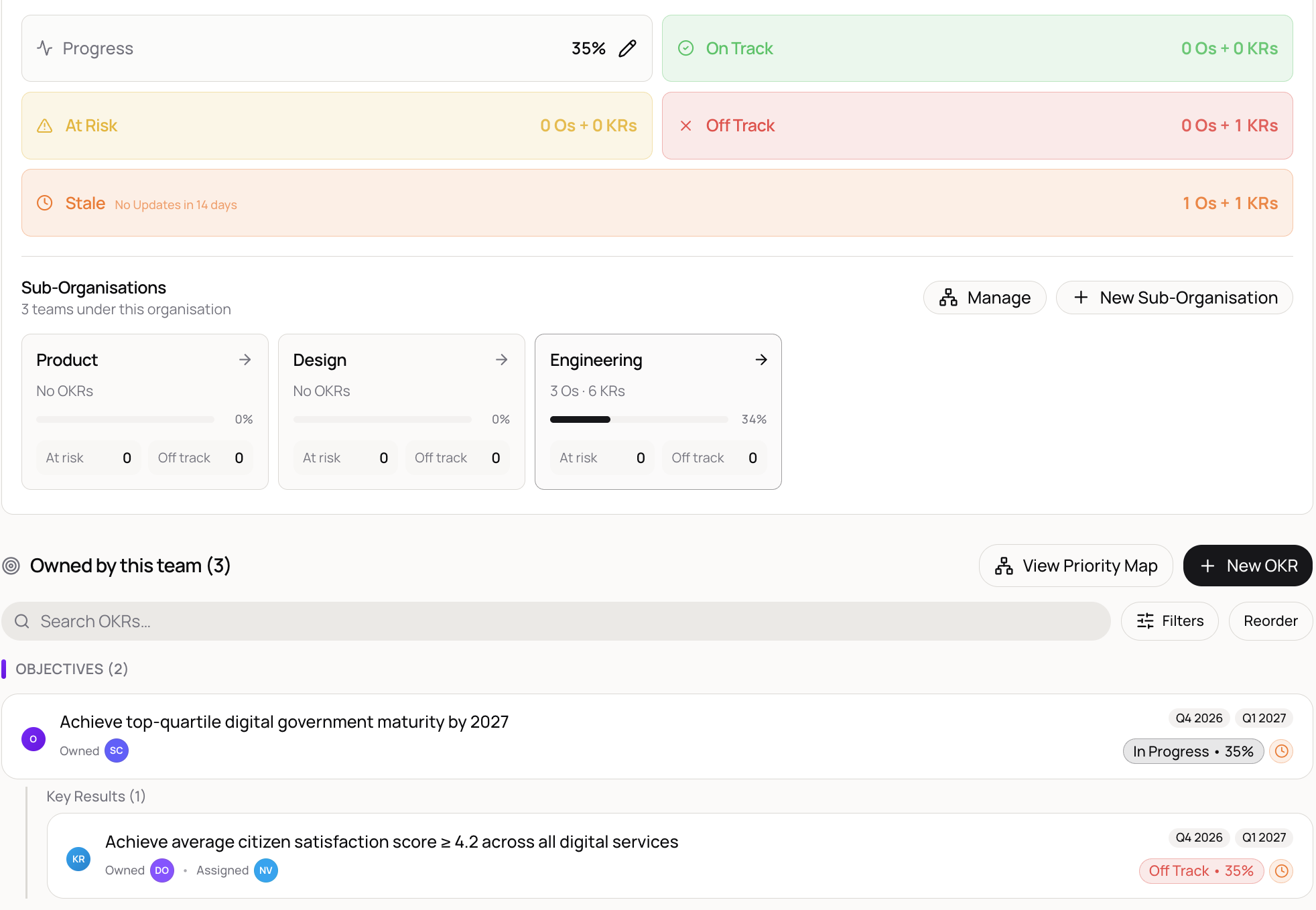
- Health summary. Counts of objectives (Os) and key results (KRs) that are At Risk, Off Track or Stale. Stale means no update in 28 days.
- Sub-Organisations. One card per cluster, division or team below this one, with its OKR count, overall progress and at-risk / off-track counts. Click a card to drill down.
- Owned by this team. The organisation's own objectives, each with its key results, owner, quarter, status and progress.
- View Priority Map, Filters, Reorder. Change how the list is shown.
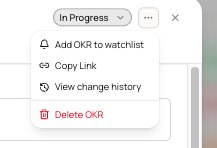
The ••• menu on every OKR
Part 1 · Using OKReator
Help by topic
How-tos and answers, in one place. Pick a topic below.
Part 1 · Using OKReator
Role permissions
Visibility and permissions at a glance.
Visibility
| Where the OKR lives | Who can see it | Where it shows |
|---|---|---|
| Organisation OKR | Visible to the whole organisation | In My Agency's OKRs |
| OKR Space | Space members, or the whole agency if set to agency-visible | In OKR Spaces |
| Personal | You, plus anyone you add as assignee or contributor | In My OKRs |
Permissions
| Action | Owner | Assignee | Contributor | Space owner | Org manager |
|---|---|---|---|---|---|
| Edit an OKR and post updates | ✓ | ✓ | ✓ | ✓ | ✓ |
| Delete an objective or key result | ✓ | ✓ | ✓ | ✓ | ✓ |
| Reorder objectives and key results | – | – | – | ✓ | ✓ |
| Add, remove or invite space members | – | – | – | ✓ | – |
| Create sub-organisations, grant managers | – | – | – | – | ✓ |
Every OKR needs at least one owner. Assignees are directly accountable to the owner and do the work; contributors help, for example from other divisions or by managing reporting. Any space member can reorder key results within an objective in their space. System administrators have full access to all actions above.
Part 1 · Using OKReator
Connect OKReator to Claude
Read, update and report on OKRs by asking Claude. Once connected, Claude can read your OKRs, create OKRs, post updates, add tasks and comment — all with your own permissions. It can't delete anything.
Setup instructions are available inside OKReator once you've signed in. Open your profile and follow the step-by-step guide to connect Claude in a few minutes.
Good habits. Name the quarter and the space or division so things land in the right place. Ask Claude to show you a draft before it creates or changes anything. Claude can only do what your OKReator account can do.
Your team has 1 objective and 3 key results in Q4 2026. One is complete, one is on track, and one needs attention:
KR 1.2's latest update says two agencies still route requests by email. Want me to draft a comment to the owner?
Illustration with example data.
Prompts to try
See what's on your plate
List the OKRs I own or am assigned to this quarter.
Post an update
Post an update on KR 1.5: 45%, off track. Adoption clinics start next week; need comms support from each cluster.
Draft OKRs
Help me turn these priorities into one objective with 3 to 5 measurable key results for Q1 2027, then show me before creating anything: …
Check your team
Show my direct reports' OKRs and which key results haven't been updated recently.
Manage tasks
List open tasks under KR 2.1 with their owners and deadlines.
Division health check
Show the Q4 2026 OKR tree for my division and flag anything at risk or off track.
Prepare a report
Summarise all off-track key results this quarter in a table, with the latest update note and owner.
Check access
What's my OKReator scope?
Add a member
Invite colleague@tech.gov.sg to the Project X space as a member.
Part 1 · Using OKReator
Ask AI about this guide
AI tools can't open this site because it's on the government network. Give them the guide instead, in one of two ways.
Paste the guide into a chat
- Copy the guide.
- Paste it into a new chat in your AI tool, followed by the prompt below.
- Ask your question.
Upload the guide as a file
- Download the guide as a Markdown file.
- Attach it to a chat in your AI tool, or add it to a project, custom assistant or knowledge base.
- Add the prompt as the instructions, so answers stay within the guide.
Prompt
Answer my questions about OKReator and OKRs using only the guide above. If the answer isn't in the guide, say so and suggest asking in #ask-okreator on Slack.
Part 2 · OKR playbook
Why OKRs
Agree the few outcomes that matter, and make progress visible. OKRs align work across the organisation and create regular conversations about what to change next.
Set goals
Turn strategy into a few concrete outcomes leaders and teams can act on.
Track progress
Make the current result, trajectory, risks and next actions visible.
Align
See how outcomes relate, where teams depend on each other, and where they compete for capacity.
Collaborate
Give teams a shared result to work toward, not just activities to coordinate.
Decide
Create a regular basis to pivot, accelerate, simplify, stop, scale or ask for help.
An OKR is not
A list of everything a team does, a project plan, a task list or a set of routine KPIs.
OKRs vs KPIs
KPIs monitor ongoing health. Use an OKR when a meaningful change needs focused attention, trade-offs or coordinated effort.
Part 2 · OKR playbook
Cascading & laddering
Connect OKRs where there's a real relationship. Each layer — from organisation to cluster, division, team and individual — can run its own OKR cycle.
Based on GovTech's Q3 2026 agency OKRs. WOG = whole-of-government.
The link between an Objective and the Key Results created under it. When you add a KR to an Objective, that Objective becomes the KR's parent. Each KR has exactly one parent Objective. In the diagram, KR 1.2's parent is the Agency Objective.
A manual link set via the Aligns to (above) field on the create or edit form. Points any OKR to another OKR higher in the tree to show it contributes — without changing where it sits. In the diagram, the AI Adoption Team's Objective aligns to Agency KR 1.2, and Gov Digital Transformation's Key Result aligns to the Agency Objective.
Parent connects an Objective to its own KRs. Aligns to draws links across the tree.
Cascading gives context from the layer above; laddering shows how a layer contributes back. Individual OKRs are agreed with your manager each quarter.
If the layer above…
Has a relevant objective or KR
Say whether your OKR contributes directly, removes a constraint, or is shared.
Has a broad priority but no clear KR
Translate it into the outcome your layer can own, and make the link explicit.
Hasn't set OKRs
Start from strategy, the 4 pillars, your users and your biggest constraint. Don't invent a parent OKR.
Has an objective that doesn't fit your work
Don't force-fit. Explain any link, and raise the gap with the relevant leader.
Test your alignment: What important outcome moves if we succeed? Is our contribution direct, enabling or shared? If our OKR doesn't move, what becomes slower, harder or less likely?
Part 2 · OKR playbook
Writing good OKRs
Anchor on GovTech's 4 pillars, then test your OKR. The pillars are context, not a checklist.
Empowered Agencies, Better Services
Will this build product capabilities in agencies, or help them deliver products cheaper, better and faster to achieve policy outcomes?
Trusted Foundations, Secure Experience
Will this make digital services or the workplace more secure, reliable, productive or trusted?
Bolder Innovation, Future-ready
Which shift will matter to Government in the next few years, and are we building the capabilities, platforms or partnerships to be ready when it does?
One GovTech, Built to Deliver
Will this grow our people and talent, or strengthen our values of ownership, candour and openness, and learning and growth?
Questions to ask before you publish
- Does it describe a meaningful change over the next 6–12 months, not a list of activities?
- Would someone outside the team understand why it matters?
- How does it connect to strategy, a pillar or a key constraint?
- If we hit all of them, would the objective be achieved this quarter?
- Are they outcomes, with a baseline, target, deadline and data source?
- Could someone else check our progress from the evidence?
- Is the target a stretch but achievable, neither sandbagged nor wishful?
- What would we have to do differently to hit it?
- Which dependencies or trade-offs should we raise now?
Part 2 · OKR playbook
Measuring progress
Compute progress. Don't estimate it. Numeric key results get their progress from a baseline and a target. Qualitative key results get it from milestones agreed up front.
Numeric key results
50%
Avoid
Marking a numeric key result "about 60%" because it feels on track, or entering the current value as the progress. In the calculator above, usage of 55% is 50% progress, not 55%.
Do
Record the baseline at the start, compute progress from it, and quote the numbers in your update so readers can check them.
What to record for every numeric key result
Baseline
Where it started, with the date and denominator
Target
The result expected, by a set date
Actual
The latest result and when it was measured
Evidence
Source, calculation or link so others can verify
Trajectory
Your judgement: will we hit the target?
Qualitative key results
Some key results are a deliverable rather than a number, such as "Create a strategy for xyz". Break them into milestones at the start of the quarter, then report against those milestones and link the evidence. If an outcome can't be measured yet, use milestones for now and say when the outcome measure will be available.
Done
- ✓ Stakeholder interviews with 12 agencies · interview notes
- ✓ Current-state assessment · assessment deck
- ✓ Options paper circulated for comment · options paper
Next
- ○ Consolidate feedback and recommend an option, by 14 Nov
- ○ EXCO endorsement, 5 Dec
Part 2 · OKR playbook
How to manage OKR cycles
Four cadences keep OKRs useful. Monthly reviews and quarter-end retrospectives turn OKRs into active management, not static reporting.
Set or refresh the objective
Define the change and why it matters.
Set the next key results
Confirm baselines, targets, deadlines and evidence sources.
Review and decide
Check progress and trajectory. Pivot, accelerate, simplify, stop, scale or escalate. How
Retrospective
What happened, why, what we learned and what to change. Then set next quarter's key results.
When to update status: before each monthly review, and sooner if the result, trajectory, risk or a dependency changes materially. OKReator marks a key result Stale after 28 days without an update (configurable by your administrator).
Questions for the quarter-end retrospective
Outcomes
- Which key results did we hit, and what made the difference?
- Which did we miss, and was it the plan, the target or something outside our control?
- Were the key results the right measures of the objective?
People, process and systems
- Did teams have the capacity, skills and decision rights to deliver?
- Which ways of working helped us move faster, and which slowed us down?
- What would help us hit targets more consistently next quarter?
Ambition
- Were targets stretching but achievable? Watch for sandbagging (setting targets low to look good) as much as for wishful targets.
The OKR process itself
- Where did planning or reporting create toil, such as duplicate reporting or manual data pulls?
- What can we simplify in the process or the tool, while keeping owners accountable for outcomes?
End with what you'll keep, change or drop next quarter to move closer to the objective.
Part 2 · OKR playbook
OKR reviews
Run a monthly or quarterly OKR review. Present live from OKReator, or have Claude pull the latest data and draft a discussion deck.
How to run a review
A review is not a round-robin of activities. Each owner leads with the result and the decision needed.
- Result. Where are we against the baseline and target?
- Trajectory. Are we likely to hit the target by the deadline?
- Diagnosis. What changed? If off track, what's the main constraint or cause?
- What changes. Before the next review: pivot, accelerate, simplify, stop or continue?
- The ask. What decision, support or dependency is needed, from whom, by when?
Option A: Present from OKReator
Open Presentations in the sidebar and pick a room, such as "Engineering Q Review". Everyone sees live status, so there's no deck to keep in sync.
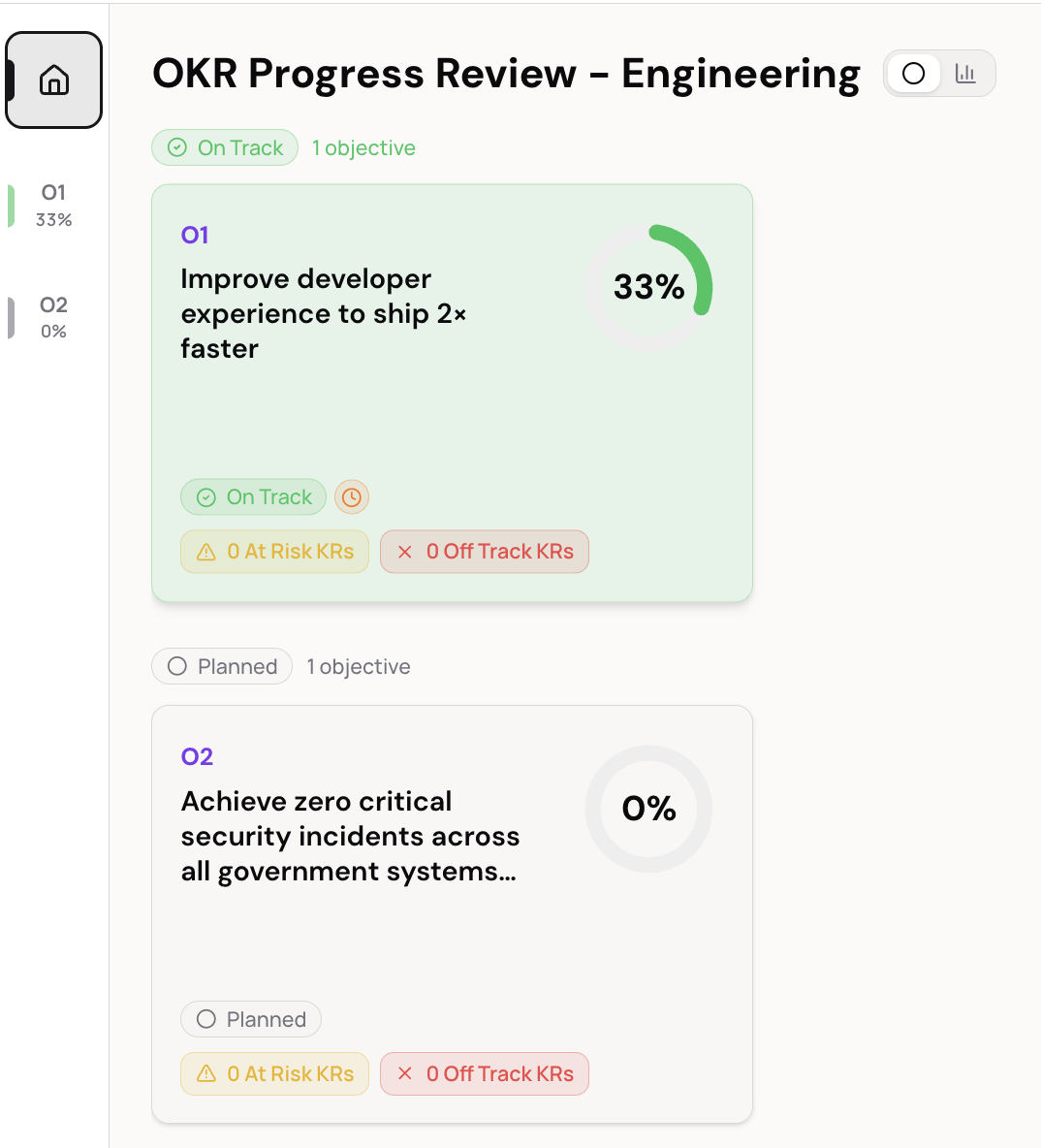
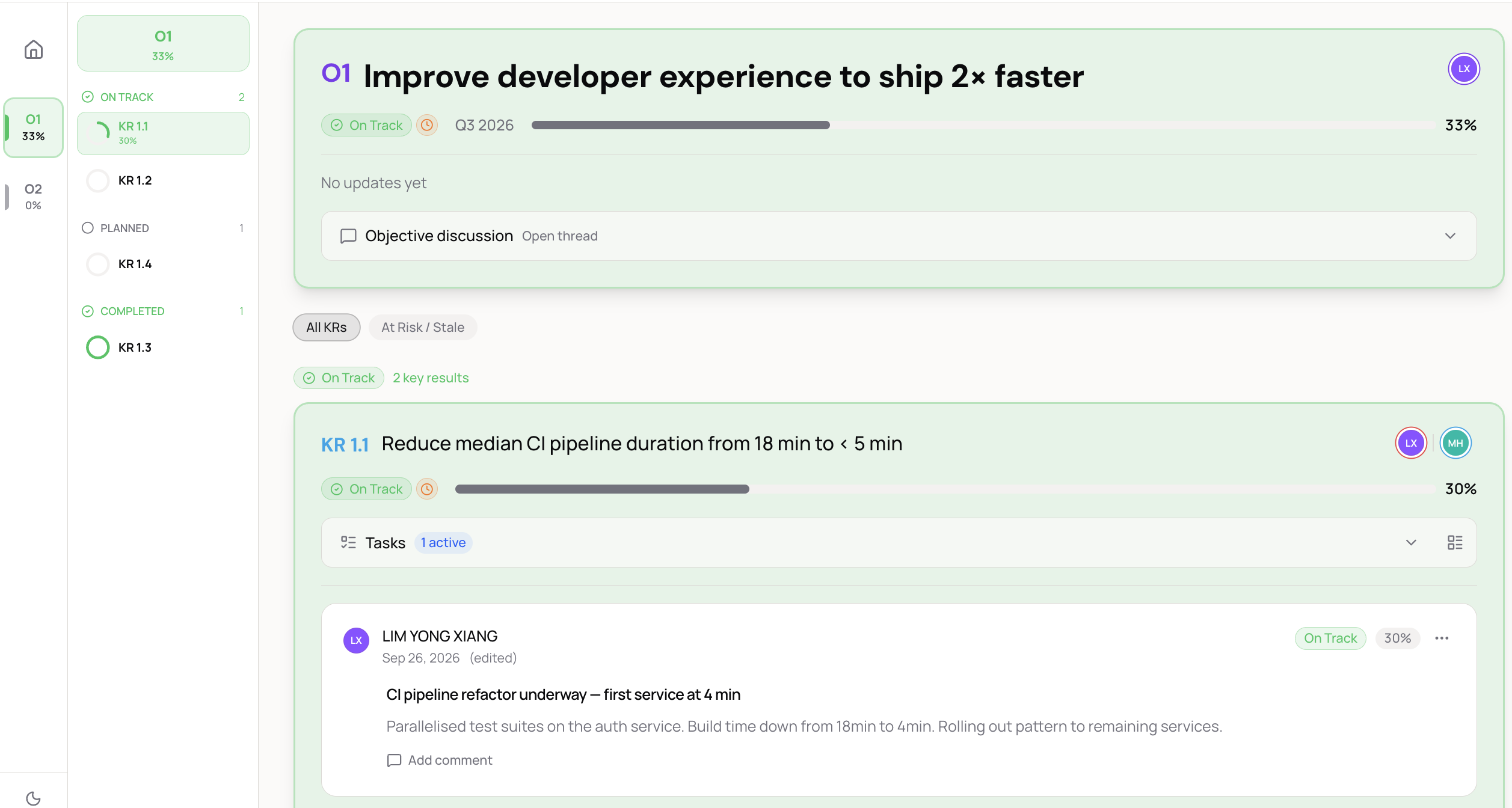
- Present puts you in control; others in the room follow along as you move between objectives.
- At Risk / Stale filters the view to the key results that need discussion.
- Discussion threads on each objective and key result keep decisions next to the OKR.
- Switch quarters with the cycle picker at the top.
Option B: Have Claude draft a review deck
With the OKReator connector on, Claude can read your OKRs and updates and build slides for discussion. Best used on the key results that are at risk or off track, where the team needs to decide what to change.
Example: a targeted deep dive on one off-track key result, built to get a decision in the room.
Biggest drop is from first use to weekly use (34% → 9%). Awareness isn't the constraint; habit is.
Ask: approve B and nominate 3 pilot divisions by 15 Oct.
Illustrative figures. Scroll sideways for all three slides.
Prompts for review prep
Deep dive on one KR
Do a deep dive on KR 1.5 for our monthly review. Pull its updates and data, show the result and trajectory against target, diagnose the main constraint, and draft 2–3 pivot options with a recommendation and the ask. Make each slide title state the finding.
Monthly check-in
Summarise what changed in my division's OKRs this month: new updates, status changes, and any KRs with no update in 28 days.
Retrospective pre-read
Write a one-page pre-read for our quarterly retrospective: what we hit, what we missed and why, based on the KR updates.
Claude's slides are only as good as the updates behind them. Check the numbers against OKReator before you present, and ask owners of stale KRs to update first.